Discover the Unique Artistry of Tony: A Decorative Display Font
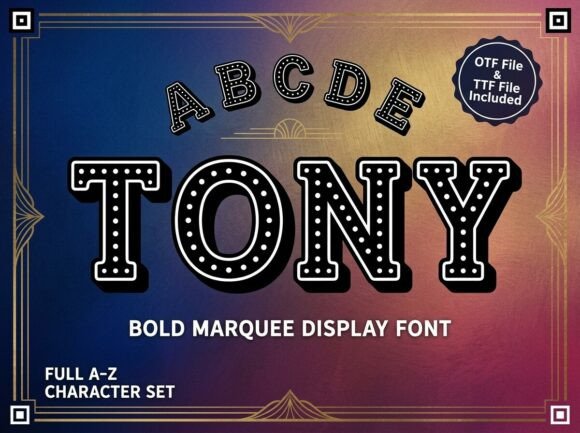
Tony is a captivating decorative display font that stands out with its unique artistic elements and strong visual personality. Perfect for creators looking to break away from the ordinary, Tony offers versatility for bold headlines, artistic logos, and creative packaging, all while maintaining a professional and polished finish.
Understanding the All-Caps Design of Tony
One of the most distinctive features of Tony is that it is an ALL-CAPS Uppercase Only display typeface. This means it does not include lowercase letters. It is specifically designed for high-impact headlines, logos, and decorative initials where every letter is a work of art. This design choice can sometimes confuse users who are not familiar with such fonts, leading to potential misuse or disappointment.
Avoiding Common Mistakes with Tony
When using Tony, it's essential to understand its intended use and limitations. Here are some common mistakes and how to avoid them:
- Mistake 1: Using Tony for Body Text
- Why It's a Problem: The all-caps nature and decorative style of Tony make it unsuitable for long blocks of text, which can be overwhelming and hard to read.
- Better Approach: Use Tony for headlines, logos, and short, impactful statements. For body text, pair it with a clean, readable font like Arial or Helvetica.
- Mistake 2: Ignoring File Formats
- Why It's a Problem: Tony comes in OTF (OpenType Font) and TTF (TrueType Font) formats. Using the wrong format can lead to compatibility issues, especially in different design software.
- Better Approach: Understand the differences between OTF and TTF. OTF is generally more advanced and suitable for professional design software, while TTF is more universally compatible across devices. Choose the format that best fits your project needs.
- Mistake 3: Overlooking the All-Caps Nature
- Why It's a Problem: Some users may not realize that Tony only includes uppercase letters, leading to confusion when they try to use it for lowercase text.
- Better Approach: Always check the font's specifications before purchasing. If you need both uppercase and lowercase letters, consider a different font or pair Tony with a complementary font that includes lowercase characters.
Practical Tips for Using Tony Effectively
To get the most out of Tony, follow these practical tips:
- Pair with Readable Fonts: Combine Tony with a simple, legible font for body text to ensure readability and balance.
- Test in Different Contexts: Before finalizing your design, test Tony in various contexts to see how it performs in different sizes and backgrounds.
- Consider the Audience: Think about your target audience and the message you want to convey. Tony is ideal for projects that require a bold, artistic, and attention-grabbing look.
Final Checks Before Making a Decision
Before you decide to use Tony for your next project, make sure to:
- Understand its all-caps nature and how it will fit into your design.
- Check the file formats (OTF and TTF) and their compatibility with your design tools.
- Experiment with pairing Tony with other fonts to create a balanced and visually appealing design.
By following these guidelines, you can effectively use Tony to create stunning, high-impact designs that stand out and leave a lasting impression.