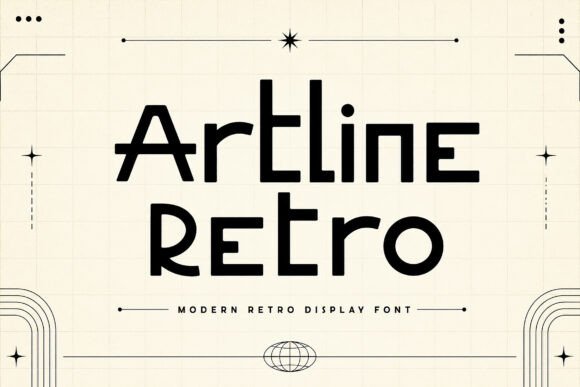
Artline Retro: A Modern Retro Display Font for Bold and Memorable Designs
Artline Retro is a unique typeface that seamlessly blends vintage-inspired aesthetics with a clean, futuristic touch. Designed with geometric curves, sleek lines, and distinctive letterforms, this font brings a perfect balance of nostalgia and innovation to your creative projects. Whether you're designing logos, branding, posters, album covers, apparel graphics, packaging, social media content, or editorial headlines, Artline Retro delivers a bold and memorable visual impact.
Understanding the Versatility of Artline Retro
The versatile retro-futuristic style of Artline Retro makes it an ideal choice for a wide range of projects. From music festivals and café branding to fashion labels and creative marketing materials, this font helps your designs stand out with confidence and style. Its unique character can add a modern vintage feel with a strong personality, making it a valuable asset in any designer's toolkit.
Integrating Artline Retro into Your Design Workflow
When integrating Artline Retro into your design process, consider the following steps to ensure a smooth and effective implementation:
- Pre-Design Planning: Before starting your project, brainstorm the overall aesthetic and message you want to convey. Determine how Artline Retro can complement and enhance your design vision.
- Compatibility Check: Ensure that Artline Retro is compatible with the software and platforms you use. Most modern design tools, such as Adobe Creative Suite, Canva, and Figma, support custom fonts.
- Initial Sketches and Mockups: Create initial sketches and mockups using Artline Retro to visualize how the font will look in different contexts. This step helps in making early adjustments and refining the design.
- Feedback and Iteration: Gather feedback from colleagues, clients, or stakeholders. Use this input to make necessary adjustments and refine the design further.
- Final Implementation: Once the design is finalized, implement Artline Retro in your project. Pay attention to details such as kerning, tracking, and line spacing to ensure optimal readability and visual appeal.
Practical Use Cases for Artline Retro
Artline Retro can be used in various stages of a project, from initial concept development to final execution. Here are some practical use cases:
- Logo Design: Use Artline Retro to create a distinctive and memorable logo that stands out. The font's unique character can help establish a strong brand identity.
- Branding Materials: Incorporate Artline Retro into business cards, brochures, and other branding materials to maintain a consistent and visually appealing brand image.
- Social Media Graphics: Enhance your social media posts with Artline Retro to grab attention and increase engagement. The font's bold and stylish appearance can make your content more shareable.
- Editorial Headlines: Use Artline Retro for magazine and blog headlines to add a touch of elegance and sophistication. The font's clean lines and geometric shapes work well in both digital and print formats.
Enhancing Usability and Efficiency
To maximize the usability and efficiency of Artline Retro in your projects, consider the following tips:
- Consistency: Maintain consistency in the use of Artline Retro across all design elements. Consistent typography helps in building a cohesive and professional look.
- Quality Control: Regularly review and test your designs to ensure that Artline Retro is displayed correctly across different devices and platforms. This step helps in maintaining high-quality standards.
- Long-Term Use: Plan for the long-term use of Artline Retro by creating a style guide that outlines the proper usage, variations, and best practices. This guide can be a valuable resource for future projects and collaborations.
Collaboration and Integration
When working in a team or collaborating with others, Artline Retro can be easily integrated into shared design files and workflows. Here’s how you can facilitate collaboration:
- Shared Access: Ensure that all team members have access to the font file. This can be done through cloud storage or design collaboration tools like Dropbox, Google Drive, or InVision.
- Clear Communication: Clearly communicate the intended use and style guidelines for Artline Retro to all team members. This helps in maintaining a consistent and unified design approach.
- Version Control: Use version control systems to manage and track changes in design files. This ensures that everyone is working on the most up-to-date version and prevents conflicts.
Conclusion
Artline Retro is a powerful and versatile font that can elevate your design projects with its unique blend of vintage and futuristic elements. By carefully planning, implementing, and maintaining consistency, you can integrate Artline Retro seamlessly into your workflow. Whether you are a professional designer, marketer, or small business owner, this font offers a bold and memorable way to make your designs stand out.